

In Microsoft Intune, a single administrator can deploy apps, run scripts across thousands of devices, wipe endpoints, or modify security policies in seconds. That level of power is incredibly useful – but also incredibly dangerous. A compromised admin account or a simple configuration mistake could impact every managed device in your environment.
Multi Admin Approval (MAA) is designed to prevent that. It introduces a two-person approval process for sensitive changes, ensuring no single administrator can push high-impact changes without oversight.
Why Multi Admin Approval Matters
Administrative identities are prime targets for attackers. If an attacker gains access to an Intune admin account, they could:
-
Deploy malicious scripts across endpoints
-
Remove compliance or security policies
-
Modify RBAC permissions
-
Retire or wipe devices
-
Push unwanted applications
Multi Admin Approval introduces separation of duties, meaning:
-
One administrator submits a change.
-
A second authorised administrator reviews it.
-
Only then is the change applied.
This creates an essential security control that aligns with Zero Trust and modern privileged access management practices.
What You Can Protect
Multi Admin Approval is configured using Access Policies, which define which resources require approval before changes are applied.
Protected resources include:
-
App deployments
-
Compliance policies
-
Configuration policies (Settings Catalog)
-
Device actions such as wipe or retire
-
RBAC role changes
-
Script deployments
-
Tenant configuration
-
Access policy management itself
Once enabled, any modification to these resources requires approval.
Prerequisites
Before configuring Multi Admin Approval, ensure:
-
The tenant has at least two administrator accounts
-
Each account has a Microsoft Intune license that supports administrative access (for example, Microsoft 365 Business Premium, E3, or E5)
-
An approver group exists in Microsoft Entra ID
-
Approvers have the Approval for Multi Admin Approval permission
-
The approver group is included in an Intune role assignment
Microsoft recommends using custom roles with least privilege instead of full Intune Administrator roles for routine access policy management.
Submitting a Change Request
When an administrator modifies a protected resource, they will see a new field before saving:
Business justification
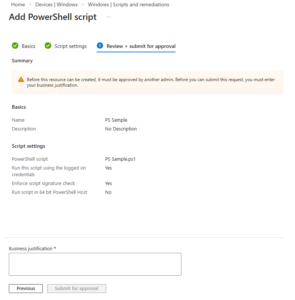
This explanation becomes part of the approval request.
After submission, the request appears under:
Tenant administration → Multi Admin Approval → My Requests
The request status will show Needs approval until an approver reviews it.
Approving Requests
Approvers review requests from:
Tenant administration → Multi Admin Approval → Received Requests
For each request they can:
-
Review the justification
-
Add notes
-
Approve or reject
If approved:
-
The request status changes to Approved
-
The requestor selects Complete
-
Intune applies the change
-
Status becomes Completed
Requests remain visible for 30 days.
Operational Considerations
A few things to keep in mind when enabling Multi Admin Approval:
-
Intune does not send approval notifications
-
Approvers should be contacted for urgent changes
-
Only one pending request per object is allowed
-
All actions are logged in Intune audit logs
Final Thoughts
Multi Admin Approval is one of the simplest ways to dramatically improve governance and security in Microsoft Intune.
By requiring a second administrator to approve sensitive changes, organisations can:
-
Reduce the impact of compromised admin accounts
-
Prevent accidental large-scale configuration errors
-
Strengthen operational change control
For organisations managing hundreds or thousands of endpoints, enabling Multi Admin Approval should be considered a baseline security control for Intune administration.